


New Organizations
How do I know if my organization is new or returning?
If you are not on this online nonprofit list you are a new organization. However, you may already have an organizational account on the portal and do not need to activate it again.
Activating Your Nonprofit Portal Account
- Step 1: Create your personal login.
- Step 2: Activate your Nonprofit Portal Account. This is a one-time setup that remains valid for the duration of your account. Approval may take up to 24 hours (one business day).
After Activation
- Once your nonprofit portal account is activated, you’ll receive an email notification.
- The activation page will no longer be accessible via the Activate Portal Account button above.
- If you see an "Access Denied" message, your account is already activated, and you can proceed to Part 1: Nonprofit and Contact Information.
Apply
The application has two required parts:
- Nonprofit and Contact Information
- Eligibility and Other Information - upload required documents in this part
Three Required Documents for Independent Nonprofit Organizations
Download checklist for independent nonprofit organizations here (.pdf)
Before starting, gather the following three required documents in a folder for easy access:
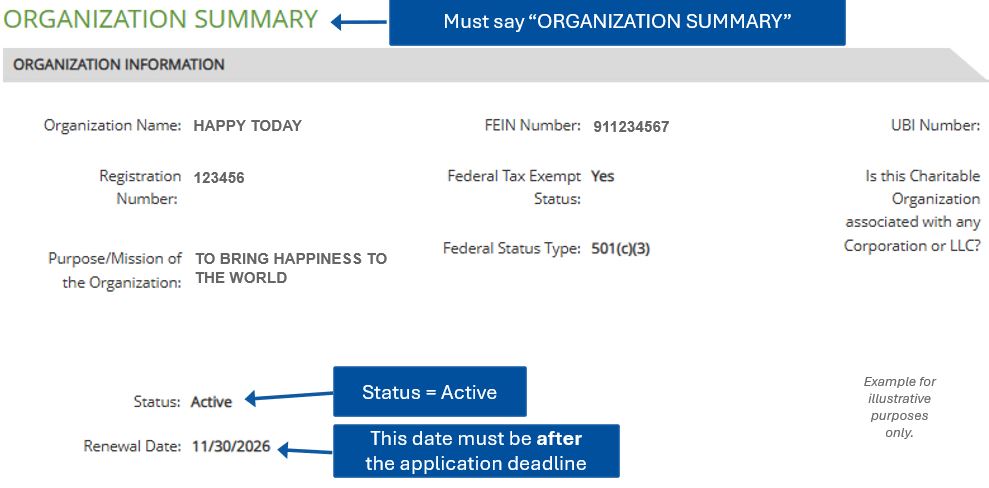
- A screenshot or PDF of your organization's listing on the Washington Secretary of State's charities program website. Access the charities/fundraiser/trust search here. .
- Organization Summary shown at the top.
- Status is active.
- The renewal date must be after the application deadline. If not, submit paperwork to the Secretary of State before completing your application.
- A copy of your IRS determination letter see example.
- A signed King County Substitute W-9. Do not use the Federal W-9.
- Download Blank KC W-9 (.pdf)
- Instructions for Businesses (.pdf)
Checklists for Federations and Governmental Units
See Required Documents for Federations here (.pdf)
See Required Documents for Governmental Units here (.pdf)
Continue to Part 1 of the application by clicking below: